
How to Adjust the Display Contrast Voltage (VOP) for VC and VG Series Products
The display contrast of VC and VG series LCD modules is controlled by the VOP (Operating Voltage for LCD Drive). Depending on whether the module includes a built-in negative voltage generator, the adjustment method differs as follows:
A. VC and VG Series Without Built-in Negative Voltage Circuit
For models without a built-in negative voltage generator, the contrast voltage (VOP) should be adjusted using an external potentiometer as shown in the diagram below.
Please refer to the following illustration:
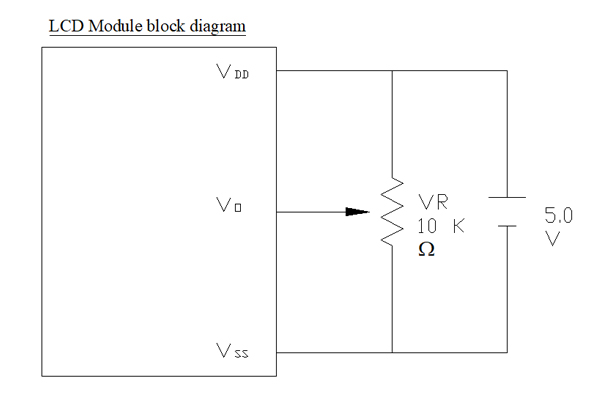
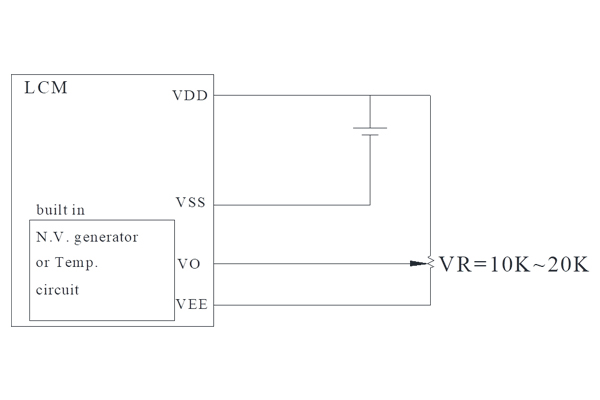
B. VC and VG Series With Built-in Negative Voltage Circuit
For models equipped with a built-in negative voltage generator, the contrast voltage (VOP) can be adjusted according to the circuit shown below. This design allows the module to generate the required negative voltage internally, simplifying the external circuit design.
Please refer to the following illustration:
Notes
- Proper VOP adjustment is essential to achieve the optimum display contrast.
- The required VOP value may vary depending on the LCD type, operating temperature, and supply voltage.
- Excessive or insufficient VOP settings may result in poor display visibility or reduced contrast.
- For detailed electrical characteristics and recommended circuits, please refer to the module specification sheet.
If you are unsure whether your VC or VG module includes a built-in negative voltage circuit, please contact Vitek's technical support team for assistance.